Wav2Vec2
This model was released on 2020-06-20 and added to Hugging Face Transformers on 2021-02-02.
Wav2Vec2
Section titled “Wav2Vec2”


Overview
Section titled “Overview”The Wav2Vec2 model was proposed in wav2vec 2.0: A Framework for Self-Supervised Learning of Speech Representations by Alexei Baevski, Henry Zhou, Abdelrahman Mohamed, Michael Auli.
The abstract from the paper is the following:
We show for the first time that learning powerful representations from speech audio alone followed by fine-tuning on transcribed speech can outperform the best semi-supervised methods while being conceptually simpler. wav2vec 2.0 masks the speech input in the latent space and solves a contrastive task defined over a quantization of the latent representations which are jointly learned. Experiments using all labeled data of Librispeech achieve 1.8/3.3 WER on the clean/other test sets. When lowering the amount of labeled data to one hour, wav2vec 2.0 outperforms the previous state of the art on the 100 hour subset while using 100 times less labeled data. Using just ten minutes of labeled data and pre-training on 53k hours of unlabeled data still achieves 4.8/8.2 WER. This demonstrates the feasibility of speech recognition with limited amounts of labeled data.
This model was contributed by patrickvonplaten.
Note: Meta (FAIR) released a new version of Wav2Vec2-BERT 2.0 - it’s pretrained on 4.5M hours of audio. We especially recommend using it for fine-tuning tasks, e.g. as per this guide.
Usage tips
Section titled “Usage tips”- Wav2Vec2 is a speech model that accepts a float array corresponding to the raw waveform of the speech signal.
- Wav2Vec2 model was trained using connectionist temporal classification (CTC) so the model output has to be decoded
using
Wav2Vec2CTCTokenizer.
Using Flash Attention 2
Section titled “Using Flash Attention 2”Flash Attention 2 is an faster, optimized version of the model.
Installation
Section titled “Installation”First, check whether your hardware is compatible with Flash Attention 2. The latest list of compatible hardware can be found in the official documentation.
Next, install the latest version of Flash Attention 2:
pip install -U flash-attn --no-build-isolationTo load a model using Flash Attention 2, we can pass the argument attn_implementation="flash_attention_2" to .from_pretrained. We’ll also load the model in half-precision (e.g. torch.float16), since it results in almost no degradation to audio quality but significantly lower memory usage and faster inference:
>>> from transformers import Wav2Vec2Model
model = Wav2Vec2Model.from_pretrained("facebook/wav2vec2-large-960h-lv60-self", dtype=torch.float16, attn_implementation="flash_attention_2").to(device)...
Expected speedups
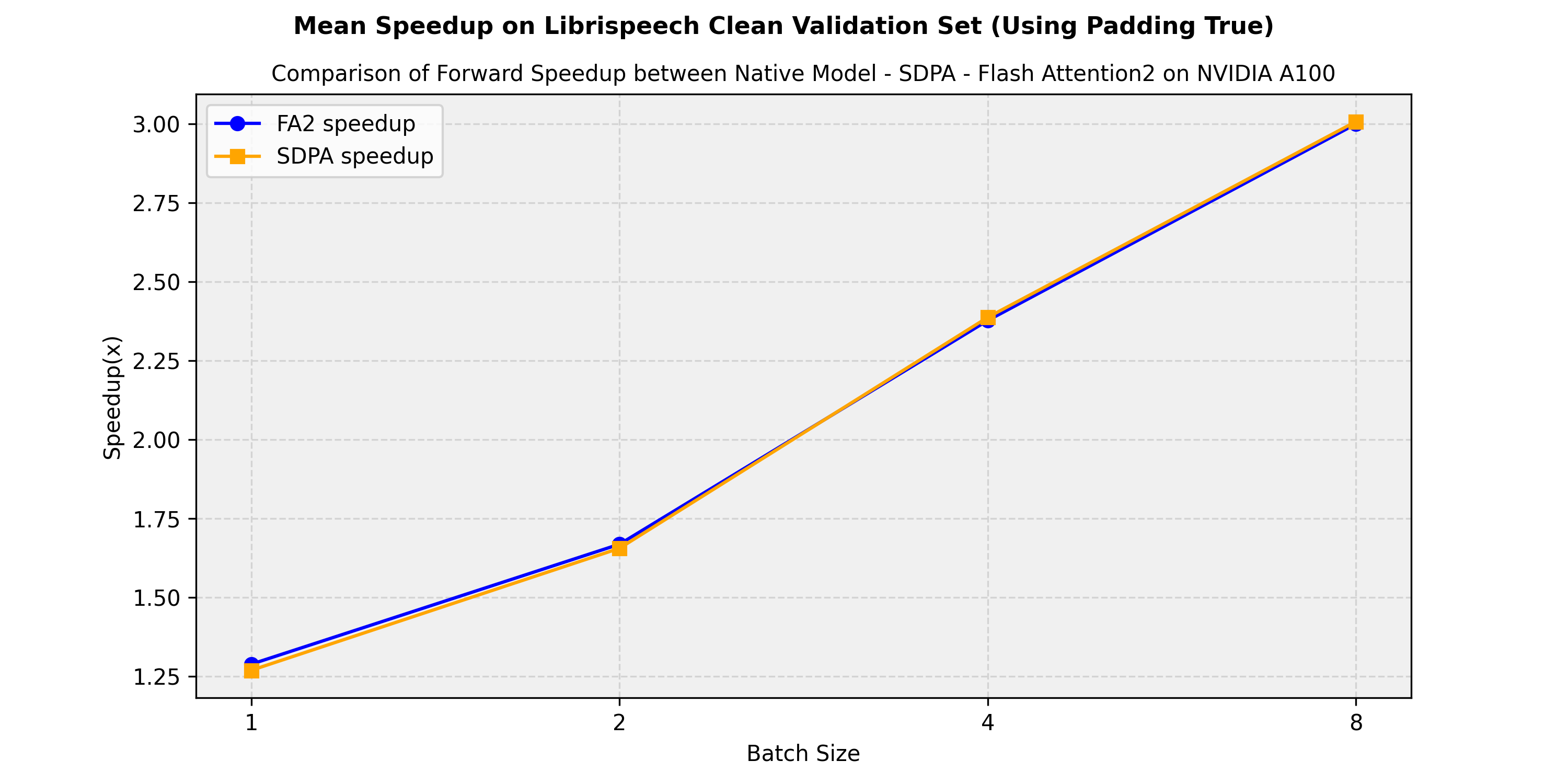
Section titled “Expected speedups”Below is an expected speedup diagram comparing the pure inference time between the native implementation in transformers of the facebook/wav2vec2-large-960h-lv60-self model and the flash-attention-2 and sdpa (scale-dot-product-attention) versions. . We show the average speedup obtained on the librispeech_asr clean validation split:
Resources
Section titled “Resources”A list of official Hugging Face and community (indicated by 🌎) resources to help you get started with Wav2Vec2. If you’re interested in submitting a resource to be included here, please feel free to open a Pull Request and we’ll review it! The resource should ideally demonstrate something new instead of duplicating an existing resource.
- A notebook on how to leverage a pretrained Wav2Vec2 model for emotion classification. 🌎
Wav2Vec2ForCTCis supported by this example script and notebook.- Audio classification task guide
- A blog post on boosting Wav2Vec2 with n-grams in 🤗 Transformers.
- A blog post on how to finetune Wav2Vec2 for English ASR with 🤗 Transformers.
- A blog post on finetuning XLS-R for Multi-Lingual ASR with 🤗 Transformers.
- A notebook on how to create YouTube captions from any video by transcribing audio with Wav2Vec2. 🌎
Wav2Vec2ForCTCis supported by a notebook on how to finetune a speech recognition model in English, and how to finetune a speech recognition model in any language.- Automatic speech recognition task guide
🚀 Deploy
- A blog post on how to deploy Wav2Vec2 for Automatic Speech Recognition with Hugging Face’s Transformers & Amazon SageMaker.
Wav2Vec2Config
Section titled “Wav2Vec2Config”[[autodoc]] Wav2Vec2Config
Wav2Vec2CTCTokenizer
Section titled “Wav2Vec2CTCTokenizer”[[autodoc]] Wav2Vec2CTCTokenizer - call - save_vocabulary - decode - batch_decode - set_target_lang
Wav2Vec2FeatureExtractor
Section titled “Wav2Vec2FeatureExtractor”[[autodoc]] Wav2Vec2FeatureExtractor - call
Wav2Vec2Processor
Section titled “Wav2Vec2Processor”[[autodoc]] Wav2Vec2Processor - call - pad - from_pretrained - save_pretrained - batch_decode - decode
Wav2Vec2ProcessorWithLM
Section titled “Wav2Vec2ProcessorWithLM”[[autodoc]] Wav2Vec2ProcessorWithLM - call - pad - from_pretrained - save_pretrained - batch_decode - decode
Decoding multiple audios
Section titled “Decoding multiple audios”If you are planning to decode multiple batches of audios, you should consider using batch_decode and passing an instantiated multiprocessing.Pool.
Otherwise, batch_decode performance will be slower than calling decode for each audio individually, as it internally instantiates a new Pool for every call. See the example below:
>>> # Let's see how to use a user-managed pool for batch decoding multiple audios>>> from multiprocessing import get_context>>> from transformers import AutoTokenizer, AutoProcessor, AutoModelForCTCfrom accelerate import Accelerator>>> from datasets import load_dataset>>> import datasets>>> import torch
>>> device = Accelerator().device>>> # import model, feature extractor, tokenizer>>> model = AutoModelForCTC.from_pretrained("patrickvonplaten/wav2vec2-base-100h-with-lm").to(device)>>> processor = AutoProcessor.from_pretrained("patrickvonplaten/wav2vec2-base-100h-with-lm")
>>> # load example dataset>>> dataset = load_dataset("hf-internal-testing/librispeech_asr_dummy", "clean", split="validation")>>> dataset = dataset.cast_column("audio", datasets.Audio(sampling_rate=16_000))

>>> def map_to_array(example):...     example["speech"] = example["audio"]["array"]...     return example

>>> # prepare speech data for batch inference>>> dataset = dataset.map(map_to_array, remove_columns=["audio"])

>>> def map_to_pred(batch, pool):...     device = Accelerator().device...     inputs = processor(batch["speech"], sampling_rate=16_000, padding=True, return_tensors="pt")...     inputs = {k: v.to(device) for k, v in inputs.items()}
...     with torch.no_grad():...         logits = model(**inputs).logits
...     transcription = processor.batch_decode(logits.cpu().numpy(), pool).text...     batch["transcription"] = transcription...     return batch

>>> # note: pool should be instantiated *after* `Wav2Vec2ProcessorWithLM`.>>> #       otherwise, the LM won't be available to the pool's sub-processes>>> # select number of processes and batch_size based on number of CPU cores available and on dataset size>>> with get_context("fork").Pool(processes=2) as pool:...     result = dataset.map(...         map_to_pred, batched=True, batch_size=2, fn_kwargs={"pool": pool}, remove_columns=["speech"]...     )
>>> result["transcription"][:2]['MISTER QUILTER IS THE APOSTLE OF THE MIDDLE CLASSES AND WE ARE GLAD TO WELCOME HIS GOSPEL', "NOR IS MISTER COULTER'S MANNER LESS INTERESTING THAN HIS MATTER"]
Wav2Vec2 specific outputs
Section titled “Wav2Vec2 specific outputs”[[autodoc]] models.wav2vec2_with_lm.processing_wav2vec2_with_lm.Wav2Vec2DecoderWithLMOutput
[[autodoc]] models.wav2vec2.modeling_wav2vec2.Wav2Vec2BaseModelOutput
[[autodoc]] models.wav2vec2.modeling_wav2vec2.Wav2Vec2ForPreTrainingOutput
Wav2Vec2Model
Section titled “Wav2Vec2Model”[[autodoc]] Wav2Vec2Model - forward
Wav2Vec2ForCTC
Section titled “Wav2Vec2ForCTC”[[autodoc]] Wav2Vec2ForCTC - forward - load_adapter
Wav2Vec2ForSequenceClassification
Section titled “Wav2Vec2ForSequenceClassification”[[autodoc]] Wav2Vec2ForSequenceClassification - forward
Wav2Vec2ForAudioFrameClassification
Section titled “Wav2Vec2ForAudioFrameClassification”[[autodoc]] Wav2Vec2ForAudioFrameClassification - forward
Wav2Vec2ForXVector
Section titled “Wav2Vec2ForXVector”[[autodoc]] Wav2Vec2ForXVector - forward
Wav2Vec2ForPreTraining
Section titled “Wav2Vec2ForPreTraining”[[autodoc]] Wav2Vec2ForPreTraining - forward