Qwen2-VL
This model was released on 2024-08-29 and added to Hugging Face Transformers on 2024-08-26.
Qwen2-VL
Section titled “Qwen2-VL”


Overview
Section titled “Overview”The Qwen2-VL (blog post) model is a major update to Qwen-VL from the Qwen team at Alibaba Research.
The abstract from the blog is the following:
This blog introduces Qwen2-VL, an advanced version of the Qwen-VL model that has undergone significant enhancements over the past year. Key improvements include enhanced image comprehension, advanced video understanding, integrated visual agent functionality, and expanded multilingual support. The model architecture has been optimized for handling arbitrary image resolutions through Naive Dynamic Resolution support and utilizes Multimodal Rotary Position Embedding (M-ROPE) to effectively process both 1D textual and multi-dimensional visual data. This updated model demonstrates competitive performance against leading AI systems like GPT-4o and Claude 3.5 Sonnet in vision-related tasks and ranks highly among open-source models in text capabilities. These advancements make Qwen2-VL a versatile tool for various applications requiring robust multimodal processing and reasoning abilities.
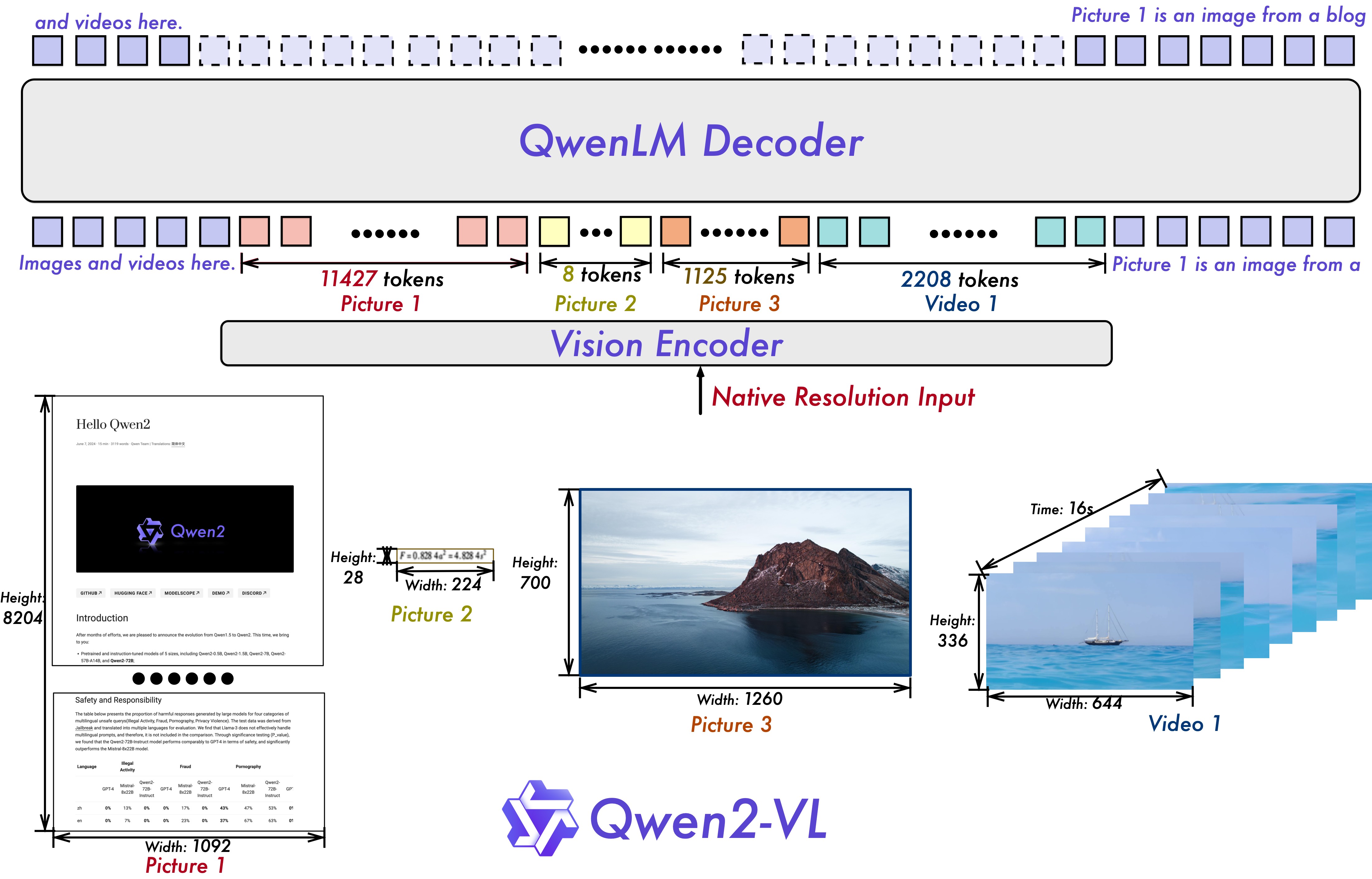
Qwen2-VL architecture. Taken from the blog post.
This model was contributed by simonJJJ.
Usage example
Section titled “Usage example”Single Media inference
Section titled “Single Media inference”The model can accept both images and videos as input. Here’s an example code for inference.
import torchfrom transformers import Qwen2VLForConditionalGeneration, AutoTokenizer, AutoProcessor
# Load the model in half-precision on the available device(s)model = Qwen2VLForConditionalGeneration.from_pretrained("Qwen/Qwen2-VL-7B-Instruct", device_map="auto")processor = AutoProcessor.from_pretrained("Qwen/Qwen2-VL-7B-Instruct")

conversation = [    {        "role":"user",        "content":[            {                "type":"image",                "url": "https://qianwen-res.oss-cn-beijing.aliyuncs.com/Qwen-VL/assets/demo.jpeg"            },            {                "type":"text",                "text":"Describe this image."            }        ]    }]
inputs = processor.apply_chat_template(    conversation,    add_generation_prompt=True,    tokenize=True,    return_dict=True,    return_tensors="pt").to(model.device)
# Inference: Generation of the outputoutput_ids = model.generate(**inputs, max_new_tokens=128)generated_ids = [output_ids[len(input_ids):] for input_ids, output_ids in zip(inputs.input_ids, output_ids)]output_text = processor.batch_decode(generated_ids, skip_special_tokens=True, clean_up_tokenization_spaces=True)print(output_text)


# Videoconversation = [    {        "role": "user",        "content": [            {"type": "video", "path": "/path/to/video.mp4"},            {"type": "text", "text": "What happened in the video?"},        ],    }]
inputs = processor.apply_chat_template(    conversation,    fps=1,    add_generation_prompt=True,    tokenize=True,    return_dict=True,    return_tensors="pt").to(model.device)

# Inference: Generation of the outputoutput_ids = model.generate(**inputs, max_new_tokens=128)generated_ids = [output_ids[len(input_ids):] for input_ids, output_ids in zip(inputs.input_ids, output_ids)]output_text = processor.batch_decode(generated_ids, skip_special_tokens=True, clean_up_tokenization_spaces=True)print(output_text)
Batch Mixed Media Inference
Section titled “Batch Mixed Media Inference”The model can batch inputs composed of mixed samples of various types such as images, videos, and text. Here is an example.
# Conversation for the first imageconversation1 = [    {        "role": "user",        "content": [            {"type": "image", "path": "/path/to/image1.jpg"},            {"type": "text", "text": "Describe this image."}        ]    }]
# Conversation with two imagesconversation2 = [    {        "role": "user",        "content": [            {"type": "image", "path": "/path/to/image2.jpg"},            {"type": "image", "path": "/path/to/image3.jpg"},            {"type": "text", "text": "What is written in the pictures?"}        ]    }]
# Conversation with pure textconversation3 = [    {        "role": "user",        "content": "who are you?"    }]

# Conversation with mixed midiaconversation4 = [    {        "role": "user",        "content": [            {"type": "image", "path": "/path/to/image3.jpg"},            {"type": "image", "path": "/path/to/image4.jpg"},            {"type": "video", "path": "/path/to/video.jpg"},            {"type": "text", "text": "What are the common elements in these medias?"},        ],    }]
conversations = [conversation1, conversation2, conversation3, conversation4]# Preparation for batch inferenceipnuts = processor.apply_chat_template(    conversations,    fps=1,    add_generation_prompt=True,    tokenize=True,    return_dict=True,    return_tensors="pt").to(model.device)

# Batch Inferenceoutput_ids = model.generate(**inputs, max_new_tokens=128)generated_ids = [output_ids[len(input_ids):] for input_ids, output_ids in zip(inputs.input_ids, output_ids)]output_text = processor.batch_decode(generated_ids, skip_special_tokens=True, clean_up_tokenization_spaces=True)print(output_text)
Usage Tips
Section titled “Usage Tips”Image Resolution trade-off
Section titled “Image Resolution trade-off”The model supports a wide range of resolution inputs. By default, it uses the native resolution for input, but higher resolutions can enhance performance at the cost of more computation. Users can set the minimum and maximum number of pixels to achieve an optimal configuration for their needs.
min_pixels = 224*224max_pixels = 2048*2048processor = AutoProcessor.from_pretrained("Qwen/Qwen2-VL-7B-Instruct", min_pixels=min_pixels, max_pixels=max_pixels)In case of limited GPU RAM, one can reduce the resolution as follows:
min_pixels = 256*28*28max_pixels = 1024*28*28processor = AutoProcessor.from_pretrained("Qwen/Qwen2-VL-7B-Instruct", min_pixels=min_pixels, max_pixels=max_pixels)This ensures each image gets encoded using a number between 256-1024 tokens. The 28 comes from the fact that the model uses a patch size of 14 and a temporal patch size of 2 (14 x 2 = 28).
Multiple Image Inputs
Section titled “Multiple Image Inputs”By default, images and video content are directly included in the conversation. When handling multiple images, it’s helpful to add labels to the images and videos for better reference. Users can control this behavior with the following settings:
conversation = [    {        "role": "user",        "content": [            {"type": "image"},            {"type": "text", "text": "Hello, how are you?"}        ]    },    {        "role": "assistant",        "content": "I'm doing well, thank you for asking. How can I assist you today?"    },    {        "role": "user",        "content": [            {"type": "text", "text": "Can you describe these images and video?"},            {"type": "image"},            {"type": "image"},            {"type": "video"},            {"type": "text", "text": "These are from my vacation."}        ]    },    {        "role": "assistant",        "content": "I'd be happy to describe the images and video for you. Could you please provide more context about your vacation?"    },    {        "role": "user",        "content": "It was a trip to the mountains. Can you see the details in the images and video?"    }]
# default:prompt_without_id = processor.apply_chat_template(conversation, add_generation_prompt=True)# Excepted output: '<|im_start|>system\nYou are a helpful assistant.<|im_end|>\n<|im_start|>user\n<|vision_start|><|image_pad|><|vision_end|>Hello, how are you?<|im_end|>\n<|im_start|>assistant\nI'm doing well, thank you for asking. How can I assist you today?<|im_end|>\n<|im_start|>user\nCan you describe these images and video?<|vision_start|><|image_pad|><|vision_end|><|vision_start|><|image_pad|><|vision_end|><|vision_start|><|video_pad|><|vision_end|>These are from my vacation.<|im_end|>\n<|im_start|>assistant\nI'd be happy to describe the images and video for you. Could you please provide more context about your vacation?<|im_end|>\n<|im_start|>user\nIt was a trip to the mountains. Can you see the details in the images and video?<|im_end|>\n<|im_start|>assistant\n'

# add idsprompt_with_id = processor.apply_chat_template(conversation, add_generation_prompt=True, add_vision_id=True)# Excepted output: '<|im_start|>system\nYou are a helpful assistant.<|im_end|>\n<|im_start|>user\nPicture 1: <|vision_start|><|image_pad|><|vision_end|>Hello, how are you?<|im_end|>\n<|im_start|>assistant\nI'm doing well, thank you for asking. How can I assist you today?<|im_end|>\n<|im_start|>user\nCan you describe these images and video?Picture 2: <|vision_start|><|image_pad|><|vision_end|>Picture 3: <|vision_start|><|image_pad|><|vision_end|>Video 1: <|vision_start|><|video_pad|><|vision_end|>These are from my vacation.<|im_end|>\n<|im_start|>assistant\nI'd be happy to describe the images and video for you. Could you please provide more context about your vacation?<|im_end|>\n<|im_start|>user\nIt was a trip to the mountains. Can you see the details in the images and video?<|im_end|>\n<|im_start|>assistant\n'
Flash-Attention 2 to speed up generation
Section titled “Flash-Attention 2 to speed up generation”First, make sure to install the latest version of Flash Attention 2:
pip install -U flash-attn --no-build-isolationAlso, you should have a hardware that is compatible with Flash-Attention 2. Read more about it in the official documentation of the flash attention repository. FlashAttention-2 can only be used when a model is loaded in torch.float16 or torch.bfloat16.
To load and run a model using Flash Attention-2, simply add attn_implementation="flash_attention_2" when loading the model as follows:
from transformers import Qwen2VLForConditionalGeneration
model = Qwen2VLForConditionalGeneration.from_pretrained(    "Qwen/Qwen2-VL-7B-Instruct",    dtype=torch.bfloat16,    attn_implementation="flash_attention_2",)
Qwen2VLConfig
Section titled “Qwen2VLConfig”[[autodoc]] Qwen2VLConfig
Qwen2VLTextConfig
Section titled “Qwen2VLTextConfig”[[autodoc]] Qwen2VLTextConfig
Qwen2VLImageProcessor
Section titled “Qwen2VLImageProcessor”[[autodoc]] Qwen2VLImageProcessor - preprocess
Qwen2VLVideoProcessor
Section titled “Qwen2VLVideoProcessor”[[autodoc]] Qwen2VLVideoProcessor - preprocess
Qwen2VLImageProcessorFast
Section titled “Qwen2VLImageProcessorFast”[[autodoc]] Qwen2VLImageProcessorFast - preprocess
Qwen2VLProcessor
Section titled “Qwen2VLProcessor”[[autodoc]] Qwen2VLProcessor
Qwen2VLTextModel
Section titled “Qwen2VLTextModel”[[autodoc]] Qwen2VLTextModel - forward
Qwen2VLModel
Section titled “Qwen2VLModel”[[autodoc]] Qwen2VLModel - forward
Qwen2VLForConditionalGeneration
Section titled “Qwen2VLForConditionalGeneration”[[autodoc]] Qwen2VLForConditionalGeneration - forward