GOT-OCR2
This model was released on 2024-09-03 and added to Hugging Face Transformers on 2025-01-31.
GOT-OCR2
Section titled “GOT-OCR2”
Overview
Section titled “Overview”The GOT-OCR2 model was proposed in General OCR Theory: Towards OCR-2.0 via a Unified End-to-end Model by Haoran Wei, Chenglong Liu, Jinyue Chen, Jia Wang, Lingyu Kong, Yanming Xu, Zheng Ge, Liang Zhao, Jianjian Sun, Yuang Peng, Chunrui Han, Xiangyu Zhang.
The abstract from the paper is the following:
Traditional OCR systems (OCR-1.0) are increasingly unable to meet people’snusage due to the growing demand for intelligent processing of man-made opticalncharacters. In this paper, we collectively refer to all artificial optical signals (e.g., plain texts, math/molecular formulas, tables, charts, sheet music, and even geometric shapes) as “characters” and propose the General OCR Theory along with an excellent model, namely GOT, to promote the arrival of OCR-2.0. The GOT, with 580M parameters, is a unified, elegant, and end-to-end model, consisting of a high-compression encoder and a long-contexts decoder. As an OCR-2.0 model, GOT can handle all the above “characters” under various OCR tasks. On the input side, the model supports commonly used scene- and document-style images in slice and whole-page styles. On the output side, GOT can generate plain or formatted results (markdown/tikz/smiles/kern) via an easy prompt. Besides, the model enjoys interactive OCR features, i.e., region-level recognition guided by coordinates or colors. Furthermore, we also adapt dynamic resolution and multipage OCR technologies to GOT for better practicality. In experiments, we provide sufficient results to prove the superiority of our model.
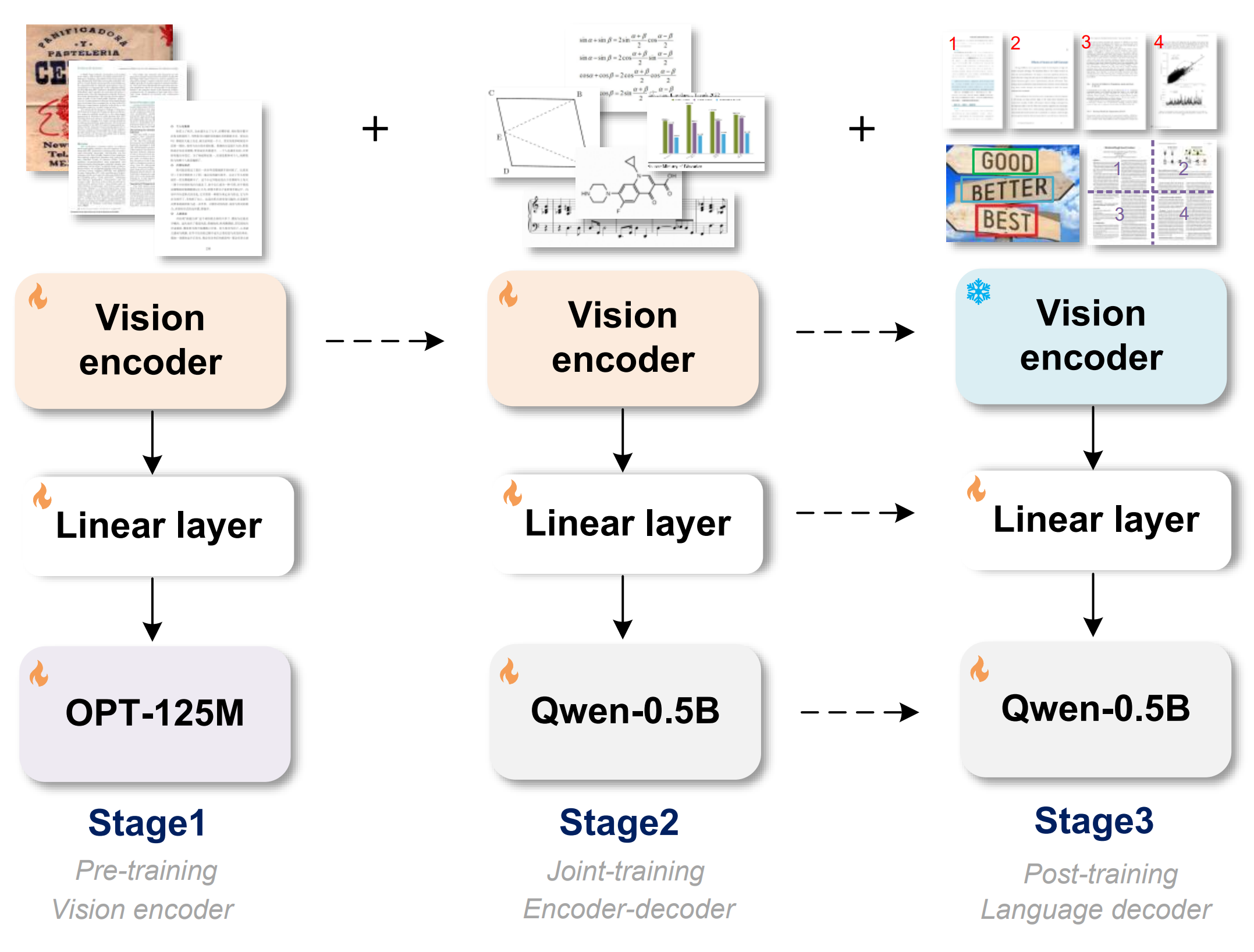
GOT-OCR2 training stages. Taken from the original paper.
Tips:
GOT-OCR2 works on a wide range of tasks, including plain document OCR, scene text OCR, formatted document OCR, and even OCR for tables, charts, mathematical formulas, geometric shapes, molecular formulas and sheet music. While this implementation of the model will only output plain text, the outputs can be further processed to render the desired format, with packages like pdftex, mathpix, matplotlib, tikz, verovio or pyecharts.
The model can also be used for interactive OCR, where the user can specify the region to be recognized by providing the coordinates or the color of the region’s bounding box.
This model was contributed by yonigozlan. The original code can be found here.
Usage example
Section titled “Usage example”Plain text inference
Section titled “Plain text inference”>>> import torch>>> from transformers import AutoProcessor, AutoModelForImageTextToTextfrom accelerate import Accelerator
>>> device = Accelerator().device>>> model = AutoModelForImageTextToText.from_pretrained("stepfun-ai/GOT-OCR-2.0-hf", device_map=device)>>> processor = AutoProcessor.from_pretrained("stepfun-ai/GOT-OCR-2.0-hf", use_fast=True)
>>> image = "https://huggingface.co/datasets/hf-internal-testing/fixtures_got_ocr/resolve/main/image_ocr.jpg">>> inputs = processor(image, return_tensors="pt", device=device).to(device)
>>> generate_ids = model.generate(... **inputs,... do_sample=False,... tokenizer=processor.tokenizer,... stop_strings="<|im_end|>",... max_new_tokens=4096,... )
>>> processor.decode(generate_ids[0, inputs["input_ids"].shape[1]:], skip_special_tokens=True)"R&D QUALITY IMPROVEMENT\nSUGGESTION/SOLUTION FORM\nName/Phone Ext. : (...)"Plain text inference batched
Section titled “Plain text inference batched”>>> import torch>>> from transformers import AutoProcessor, AutoModelForImageTextToTextfrom accelerate import Accelerator
>>> device = Accelerator().device>>> model = AutoModelForImageTextToText.from_pretrained("stepfun-ai/GOT-OCR-2.0-hf", device_map=device)>>> processor = AutoProcessor.from_pretrained("stepfun-ai/GOT-OCR-2.0-hf", use_fast=True)
>>> image1 = "https://huggingface.co/datasets/hf-internal-testing/fixtures_got_ocr/resolve/main/multi_box.png">>> image2 = "https://huggingface.co/datasets/hf-internal-testing/fixtures_got_ocr/resolve/main/image_ocr.jpg"
>>> inputs = processor([image1, image2], return_tensors="pt", device=device).to(device)
>>> generate_ids = model.generate(... **inputs,... do_sample=False,... tokenizer=processor.tokenizer,... stop_strings="<|im_end|>",... max_new_tokens=4,... )
>>> processor.batch_decode(generate_ids[:, inputs["input_ids"].shape[1] :], skip_special_tokens=True)["Reducing the number", "R&D QUALITY"]Formatted text inference
Section titled “Formatted text inference”GOT-OCR2 can also generate formatted text, such as markdown or LaTeX. Here is an example of how to generate formatted text:
>>> import torch>>> from transformers import AutoProcessor, AutoModelForImageTextToTextfrom accelerate import Accelerator
>>> device = Accelerator().device>>> model = AutoModelForImageTextToText.from_pretrained("stepfun-ai/GOT-OCR-2.0-hf", device_map=device)>>> processor = AutoProcessor.from_pretrained("stepfun-ai/GOT-OCR-2.0-hf", use_fast=True)
>>> image = "https://huggingface.co/datasets/hf-internal-testing/fixtures_got_ocr/resolve/main/latex.png">>> inputs = processor(image, return_tensors="pt", format=True, device=device).to(device)
>>> generate_ids = model.generate(...     **inputs,...     do_sample=False,...     tokenizer=processor.tokenizer,...     stop_strings="<|im_end|>",...     max_new_tokens=4096,... )
>>> processor.decode(generate_ids[0, inputs["input_ids"].shape[1]:], skip_special_tokens=True)"\\author{\nHanwen Jiang* \\(\\quad\\) Arjun Karpur \\({ }^{\\dagger} \\quad\\) Bingyi Cao \\({ }^{\\dagger} \\quad\\) (...)"
Inference on multiple pages
Section titled “Inference on multiple pages”Although it might be reasonable in most cases to use a “for loop” for multi-page processing, some text data with formatting across several pages make it necessary to process all pages at once. GOT introduces a multi-page OCR (without “for loop”) feature, where multiple pages can be processed by the model at once, with the output being one continuous text. Here is an example of how to process multiple pages at once:
>>> import torch>>> from transformers import AutoProcessor, AutoModelForImageTextToTextfrom accelerate import Accelerator
>>> device = Accelerator().device>>> model = AutoModelForImageTextToText.from_pretrained("stepfun-ai/GOT-OCR-2.0-hf", device_map=device)>>> processor = AutoProcessor.from_pretrained("stepfun-ai/GOT-OCR-2.0-hf", use_fast=True)
>>> image1 = "https://huggingface.co/datasets/hf-internal-testing/fixtures_got_ocr/resolve/main/page1.png">>> image2 = "https://huggingface.co/datasets/hf-internal-testing/fixtures_got_ocr/resolve/main/page2.png">>> inputs = processor([image1, image2], return_tensors="pt", multi_page=True, format=True, device=device).to(device)
>>> generate_ids = model.generate(...     **inputs,...     do_sample=False,...     tokenizer=processor.tokenizer,...     stop_strings="<|im_end|>",...     max_new_tokens=4096,... )
>>> processor.decode(generate_ids[0, inputs["input_ids"].shape[1]:], skip_special_tokens=True)"\\title{\nGeneral OCR Theory: Towards OCR-2.0 via a Unified End-to-end Model\n}\n\\author{\nHaoran Wei (...)"
Inference on cropped patches
Section titled “Inference on cropped patches”GOT supports a 1024×1024 input resolution, which is sufficient for most OCR tasks, such as scene OCR or processing A4-sized PDF pages. However, certain scenarios, like horizontally stitched two-page PDFs commonly found in academic papers or images with unusual aspect ratios, can lead to accuracy issues when processed as a single image. To address this, GOT can dynamically crop an image into patches, process them all at once, and merge the results for better accuracy with such inputs. Here is an example of how to process cropped patches:
>>> import torch>>> from transformers import AutoProcessor, AutoModelForImageTextToTextfrom accelerate import Accelerator
>>> device = Accelerator().device>>> model = AutoModelForImageTextToText.from_pretrained("stepfun-ai/GOT-OCR-2.0-hf", dtype=torch.bfloat16, device_map=device)>>> processor = AutoProcessor.from_pretrained("stepfun-ai/GOT-OCR-2.0-hf", use_fast=True)
>>> image = "https://huggingface.co/datasets/hf-internal-testing/fixtures_got_ocr/resolve/main/one_column.png">>> inputs = processor(image, return_tensors="pt", format=True, crop_to_patches=True, max_patches=3, device=device).to(device)
>>> generate_ids = model.generate(...     **inputs,...     do_sample=False,...     tokenizer=processor.tokenizer,...     stop_strings="<|im_end|>",...     max_new_tokens=4096,... )
>>> processor.decode(generate_ids[0, inputs["input_ids"].shape[1]:], skip_special_tokens=True)"on developing architectural improvements to make learnable matching methods generalize.\nMotivated by the above observations, (...)"
Inference on a specific region
Section titled “Inference on a specific region”GOT supports interactive OCR, where the user can specify the region to be recognized by providing the coordinates or the color of the region’s bounding box. Here is an example of how to process a specific region:
>>> import torch>>> from transformers import AutoProcessor, AutoModelForImageTextToText
>>> device = Accelerator().device>>> model = AutoModelForImageTextToText.from_pretrained("stepfun-ai/GOT-OCR-2.0-hf", device_map=device)>>> processor = AutoProcessor.from_pretrained("stepfun-ai/GOT-OCR-2.0-hf", use_fast=True)
>>> image = "https://huggingface.co/datasets/hf-internal-testing/fixtures_got_ocr/resolve/main/multi_box.png">>> inputs = processor(image, return_tensors="pt", color="green", device=device).to(device) # or box=[x1, y1, x2, y2] for coordinates (image pixels)
>>> generate_ids = model.generate(...     **inputs,...     do_sample=False,...     tokenizer=processor.tokenizer,...     stop_strings="<|im_end|>",...     max_new_tokens=4096,... )
>>> processor.decode(generate_ids[0, inputs["input_ids"].shape[1]:], skip_special_tokens=True)"You should keep in mind what features from the module should be used, especially \nwhen you’re planning to sell a template."
Inference on general OCR data example: sheet music
Section titled “Inference on general OCR data example: sheet music”Although this implementation of the model will only output plain text, the outputs can be further processed to render the desired format, with packages like pdftex, mathpix, matplotlib, tikz, verovio or pyecharts.
Here is an example of how to process sheet music:
>>> import torch>>> from transformers import AutoProcessor, AutoModelForImageTextToTextfrom accelerate import Accelerator>>> import verovio
>>> device = Accelerator().device>>> model = AutoModelForImageTextToText.from_pretrained("stepfun-ai/GOT-OCR-2.0-hf", device_map=device)>>> processor = AutoProcessor.from_pretrained("stepfun-ai/GOT-OCR-2.0-hf", use_fast=True)
>>> image = "https://huggingface.co/datasets/hf-internal-testing/fixtures_got_ocr/resolve/main/sheet_music.png">>> inputs = processor(image, return_tensors="pt", format=True, device=device).to(device)
>>> generate_ids = model.generate(...     **inputs,...     do_sample=False,...     tokenizer=processor.tokenizer,...     stop_strings="<|im_end|>",...     max_new_tokens=4096,... )
>>> outputs = processor.decode(generate_ids[0, inputs["input_ids"].shape[1]:], skip_special_tokens=True)>>> tk = verovio.toolkit()>>> tk.loadData(outputs)>>> tk.setOptions(...     {...         "pageWidth": 2100,...         "pageHeight": 800,...         "footer": "none",...         "barLineWidth": 0.5,...         "beamMaxSlope": 15,...         "staffLineWidth": 0.2,...         "spacingStaff": 6,...     }... )>>> tk.getPageCount()>>> svg = tk.renderToSVG()>>> svg = svg.replace('overflow="inherit"', 'overflow="visible"')>>> with open("output.svg", "w") as f:>>>     f.write(svg)
GotOcr2Config
Section titled “GotOcr2Config”[[autodoc]] GotOcr2Config
GotOcr2VisionConfig
Section titled “GotOcr2VisionConfig”[[autodoc]] GotOcr2VisionConfig
GotOcr2ImageProcessor
Section titled “GotOcr2ImageProcessor”[[autodoc]] GotOcr2ImageProcessor
GotOcr2ImageProcessorFast
Section titled “GotOcr2ImageProcessorFast”[[autodoc]] GotOcr2ImageProcessorFast
GotOcr2Processor
Section titled “GotOcr2Processor”[[autodoc]] GotOcr2Processor
GotOcr2Model
Section titled “GotOcr2Model”[[autodoc]] GotOcr2Model
GotOcr2ForConditionalGeneration
Section titled “GotOcr2ForConditionalGeneration”[[autodoc]] GotOcr2ForConditionalGeneration - forward