Mistral[[mistral]]
개요[[overview]]
섹션 제목: “개요[[overview]]”미스트랄은 Albert Jiang, Alexandre Sablayrolles, Arthur Mensch, Chris Bamford, Devendra Singh Chaplot, Diego de las Casas, Florian Bressand, Gianna Lengyel, Guillaume Lample, Lélio Renard Lavaud, Lucile Saulnier, Marie-Anne Lachaux, Pierre Stock, Teven Le Scao, Thibaut Lavril, Thomas Wang, Timothée Lacroix, William El Sayed가 작성한 이 블로그 포스트에서 소개되었습니다.
블로그 포스트의 서두는 다음과 같습니다:
미스트랄 AI팀은 현존하는 언어 모델 중 크기 대비 가장 강력한 미스트랄7B를 출시하게 되어 자랑스럽습니다.
미스트랄-7B는 mistral.ai에서 출시한 첫 번째 대규모 언어 모델(LLM)입니다.
아키텍처 세부사항[[architectural-details]]
섹션 제목: “아키텍처 세부사항[[architectural-details]]”미스트랄-7B는 다음과 같은 구조적 특징을 가진 디코더 전용 트랜스포머입니다:
- 슬라이딩 윈도우 어텐션: 8k 컨텍스트 길이와 고정 캐시 크기로 훈련되었으며, 이론상 128K 토큰의 어텐션 범위를 가집니다.
- GQA(Grouped Query Attention): 더 빠른 추론이 가능하고 더 작은 크기의 캐시를 사용합니다.
- 바이트 폴백(Byte-fallback) BPE 토크나이저: 문자들이 절대 어휘 목록 외의 토큰으로 매핑되지 않도록 보장합니다.
더 자세한 내용은 출시 블로그 포스트를 참조하세요.
라이선스[[license]]
섹션 제목: “라이선스[[license]]”미스트랄-7B는 아파치 2.0 라이선스로 출시되었습니다.
사용 팁[[usage-tips]]
섹션 제목: “사용 팁[[usage-tips]]”미스트랄 AI팀은 다음 3가지 체크포인트를 공개했습니다:
- 기본 모델인 미스트랄-7B-v0.1은 인터넷 규모의 데이터에서 다음 토큰을 예측하도록 사전 훈련되었습니다.
- 지시 조정 모델인 미스트랄-7B-Instruct-v0.1은 지도 미세 조정(SFT)과 직접 선호도 최적화(DPO)를 사용한 채팅에 최적화된 기본 모델입니다.
- 개선된 지시 조정 모델인 미스트랄-7B-Instruct-v0.2는 v1을 개선한 버전입니다.
기본 모델은 다음과 같이 사용할 수 있습니다:
>>> from transformers import AutoModelForCausalLM, AutoTokenizer
>>> model = AutoModelForCausalLM.from_pretrained("mistralai/Mistral-7B-v0.1", device_map="auto")>>> tokenizer = AutoTokenizer.from_pretrained("mistralai/Mistral-7B-v0.1")
>>> prompt = "My favourite condiment is"
>>> model_inputs = tokenizer([prompt], return_tensors="pt").to(model.device)>>> model.to(device)
>>> generated_ids = model.generate(**model_inputs, max_new_tokens=100, do_sample=True)>>> tokenizer.batch_decode(generated_ids)[0]"My favourite condiment is to ..."
지시 조정 모델은 다음과 같이 사용할 수 있습니다:
>>> from transformers import AutoModelForCausalLM, AutoTokenizer
>>> model = AutoModelForCausalLM.from_pretrained("mistralai/Mistral-7B-Instruct-v0.2", device_map="auto")>>> tokenizer = AutoTokenizer.from_pretrained("mistralai/Mistral-7B-Instruct-v0.2")
>>> messages = [...     {"role": "user", "content": "What is your favourite condiment?"},...     {"role": "assistant", "content": "Well, I'm quite partial to a good squeeze of fresh lemon juice. It adds just the right amount of zesty flavour to whatever I'm cooking up in the kitchen!"},...     {"role": "user", "content": "Do you have mayonnaise recipes?"}... ]
>>> model_inputs = tokenizer.apply_chat_template(messages, return_tensors="pt").to(model.device)
>>> generated_ids = model.generate(model_inputs, max_new_tokens=100, do_sample=True)>>> tokenizer.batch_decode(generated_ids)[0]"Mayonnaise can be made as follows: (...)"
지시 조정 모델은 입력이 올바른 형식으로 준비되도록 채팅 템플릿을 적용해야 합니다.
플래시 어텐션을 이용한 미스트랄 속도향상[[speeding-up-mistral-by-using-flash-attention]]
섹션 제목: “플래시 어텐션을 이용한 미스트랄 속도향상[[speeding-up-mistral-by-using-flash-attention]]”위의 코드 스니펫들은 어떤 최적화 기법도 사용하지 않은 추론 과정을 보여줍니다. 하지만 모델 내부에서 사용되는 어텐션 메커니즘의 더 빠른 구현인 플래시 어텐션2을 활용하면 모델의 속도를 크게 높일 수 있습니다.
먼저, 슬라이딩 윈도우 어텐션 기능을 포함하는 플래시 어텐션2의 최신 버전을 설치해야 합니다.
pip install -U flash-attn --no-build-isolation하드웨어와 플래시 어텐션2의 호환여부를 확인하세요. 이에 대한 자세한 내용은 플래시 어텐션 저장소의 공식 문서에서 확인할 수 있습니다. 또한 모델을 반정밀도(예: torch.float16)로 불러와야합니다.
플래시 어텐션2를 사용하여 모델을 불러오고 실행하려면 아래 코드 스니펫을 참조하세요:
>>> import torch>>> from transformers import AutoModelForCausalLM, AutoTokenizer
>>> model = AutoModelForCausalLM.from_pretrained("mistralai/Mistral-7B-v0.1", dtype=torch.float16, attn_implementation="flash_attention_2", device_map="auto")>>> tokenizer = AutoTokenizer.from_pretrained("mistralai/Mistral-7B-v0.1")
>>> prompt = "My favourite condiment is"
>>> model_inputs = tokenizer([prompt], return_tensors="pt").to(model.device)>>> model.to(device)
>>> generated_ids = model.generate(**model_inputs, max_new_tokens=100, do_sample=True)>>> tokenizer.batch_decode(generated_ids)[0]"My favourite condiment is to (...)"
기대하는 속도 향상[[expected-speedups]]
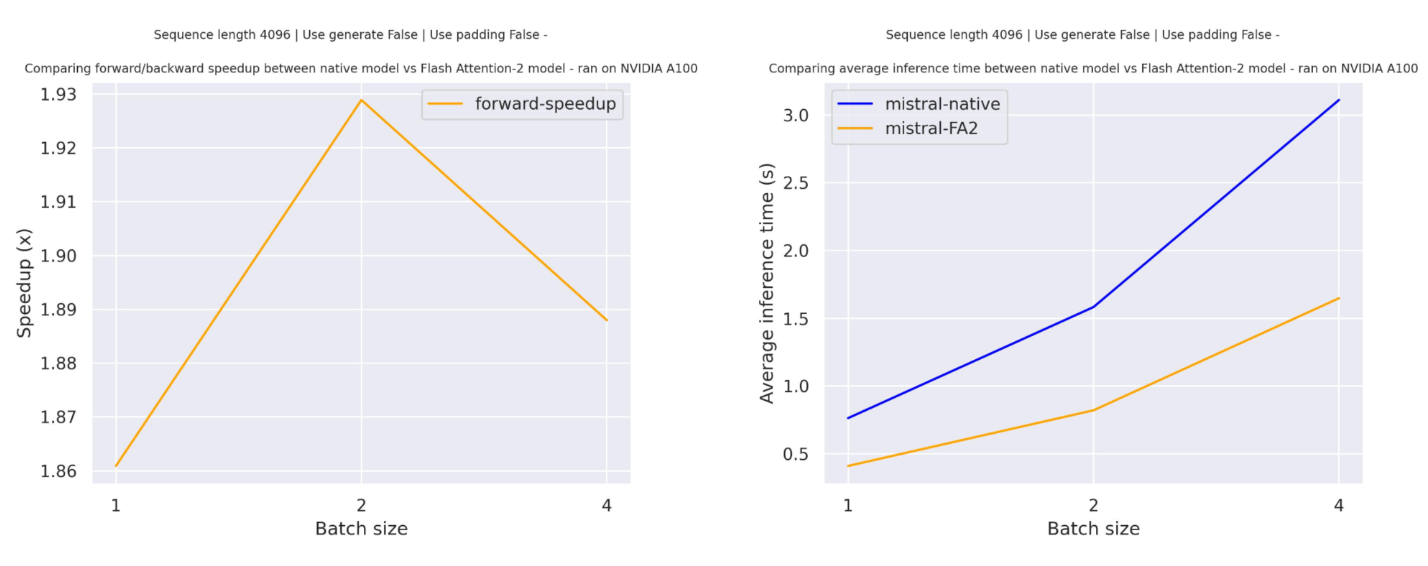
섹션 제목: “기대하는 속도 향상[[expected-speedups]]”다음은 mistralai/Mistral-7B-v0.1 체크포인트를 사용한 트랜스포머의 기본 구현과 플래시 어텐션2 버전 모델 사이의 순수 추론 시간을 비교한 예상 속도 향상 다이어그램입니다.
슬라이딩 윈도우 어텐션[[sliding-window-attention]]
섹션 제목: “슬라이딩 윈도우 어텐션[[sliding-window-attention]]”현재 구현은 슬라이딩 윈도우 어텐션 메커니즘과 메모리 효율적인 캐시 관리 기능을 지원합니다. 슬라이딩 윈도우 어텐션을 활성화하려면, 슬라이딩 윈도우 어텐션과 호환되는flash-attn(>=2.3.0)버전을 사용하면 됩니다.
또한 플래시 어텐션2 모델은 더 메모리 효율적인 캐시 슬라이싱 메커니즘을 사용합니다. 미스트랄 모델의 공식 구현에서 권장하는 롤링 캐시 메커니즘을 따라, 캐시 크기를 고정(self.config.sliding_window)으로 유지하고, padding_side="left"인 경우에만 배치 생성(batch generation)을 지원하며, 현재 토큰의 절대 위치를 사용해 위치 임베딩을 계산합니다.
양자화로 미스트랄 크기 줄이기[[shrinking-down-mistral-using-quantization]]
섹션 제목: “양자화로 미스트랄 크기 줄이기[[shrinking-down-mistral-using-quantization]]”미스트랄 모델은 70억 개의 파라미터를 가지고 있어, 절반의 정밀도(float16)로 약 14GB의 GPU RAM이 필요합니다. 각 파라미터가 2바이트로 저장되기 때문입니다. 하지만 양자화를 사용하면 모델 크기를 줄일 수 있습니다. 모델을 4비트(즉, 파라미터당 반 바이트)로 양자화하면 약 3.5GB의 RAM만 필요합니다.
모델을 양자화하는 것은 quantization_config를 모델에 전달하는 것만큼 간단합니다. 아래에서는 BitsAndBytes 양자화를 사용하지만, 다른 양자화 방법은 이 페이지를 참고하세요:
>>> import torch>>> from transformers import AutoModelForCausalLM, AutoTokenizer, BitsAndBytesConfig
>>> # specify how to quantize the model>>> quantization_config = BitsAndBytesConfig(...         load_in_4bit=True,...         bnb_4bit_quant_type="nf4",...         bnb_4bit_compute_dtype="torch.float16",... )
>>> model = AutoModelForCausalLM.from_pretrained("mistralai/Mistral-7B-Instruct-v0.2", quantization_config=True, device_map="auto")>>> tokenizer = AutoTokenizer.from_pretrained("mistralai/Mistral-7B-Instruct-v0.2")
>>> prompt = "My favourite condiment is"
>>> messages = [...     {"role": "user", "content": "What is your favourite condiment?"},...     {"role": "assistant", "content": "Well, I'm quite partial to a good squeeze of fresh lemon juice. It adds just the right amount of zesty flavour to whatever I'm cooking up in the kitchen!"},...     {"role": "user", "content": "Do you have mayonnaise recipes?"}... ]
>>> model_inputs = tokenizer.apply_chat_template(messages, return_tensors="pt").to(model.device)
>>> generated_ids = model.generate(model_inputs, max_new_tokens=100, do_sample=True)>>> tokenizer.batch_decode(generated_ids)[0]"The expected output"
이 모델은 Younes Belkada와 Arthur Zucker가 기여했습니다. 원본 코드는 이곳에서 확인할 수 있습니다.
리소스[[resources]]
섹션 제목: “리소스[[resources]]”미스트랄을 시작하는 데 도움이 되는 Hugging Face와 community 자료 목록(🌎로 표시됨) 입니다. 여기에 포함될 자료를 제출하고 싶으시다면 PR(Pull Request)를 열어주세요. 리뷰해 드리겠습니다! 자료는 기존 자료를 복제하는 대신 새로운 내용을 담고 있어야 합니다.
- 미스트랄-7B의 지도형 미세조정(SFT)을 수행하는 데모 노트북은 이곳에서 확인할 수 있습니다. 🌎
- 2024년에 Hugging Face 도구를 사용해 LLM을 미세 조정하는 방법에 대한 블로그 포스트. 🌎
- Hugging Face의 정렬(Alignment) 핸드북에는 미스트랄-7B를 사용한 지도형 미세 조정(SFT) 및 직접 선호 최적화(DPO)를 수행하기 위한 스크립트와 레시피가 포함되어 있습니다. 여기에는 단일 GPU에서 QLoRa 및 다중 GPU를 사용한 전체 미세 조정을 위한 스크립트가 포함되어 있습니다.
- 인과적 언어 모델링 작업 가이드
MistralConfig[[transformers.MistralConfig]]
섹션 제목: “MistralConfig[[transformers.MistralConfig]]”[[autodoc]] MistralConfig
MistralModel[[transformers.MistralModel]]
섹션 제목: “MistralModel[[transformers.MistralModel]]”[[autodoc]] MistralModel - forward
MistralForCausalLM[[transformers.MistralForCausalLM]]
섹션 제목: “MistralForCausalLM[[transformers.MistralForCausalLM]]”[[autodoc]] MistralForCausalLM - forward
MistralForSequenceClassification[[transformers.MistralForSequenceClassification]]
섹션 제목: “MistralForSequenceClassification[[transformers.MistralForSequenceClassification]]”[[autodoc]] MistralForSequenceClassification - forward
MistralForTokenClassification[[transformers.MistralForTokenClassification]]
섹션 제목: “MistralForTokenClassification[[transformers.MistralForTokenClassification]]”[[autodoc]] MistralForTokenClassification - forward