CodeLlama[[codellama]]
이 모델은 2023년 8월 24일에 공개되었으며, 2023년 8월 25일에 Hugging Face Transformers에 추가되었습니다.
 ">
">
CodeLlama[[codellama]]
섹션 제목: “CodeLlama[[codellama]]”Code Llama는 코딩 작업에 특화된 대규모 언어 모델 계열로, Llama 2를 기반으로 개발되었습니다. 일반적인 코드, Python 특화, 명령어(지시) 기반 변형 등 다양한 버전으로 제공되며, 모두 7B, 13B, 34B, 70B 매개변수 크기로 사용할 수 있습니다. Code Llama 모델은 코드를 생성하고 설명하며, 코드의 누락된 부분을 채울 수도 있습니다. 이를 인필링(infilling)이라고 합니다. 16K 토큰 길이로 훈련되었지만, 최대 100K 토큰까지 안정적으로 생성하며 긴 컨텍스트도 처리할 수 있습니다.
Code Llama 컬렉션에서 모든 원본 Code Llama 체크포인트를 찾을 수 있습니다.
아래 예시는 Pipeline, AutoModel, 그리고 명령줄에서 코드를 생성하는 방법을 보여줍니다.
import torchfrom transformers import pipeline
pipe = pipeline(    "text-generation",    model="meta-llama/CodeLlama-7b-hf",    torch_dtype=torch.float16,    device_map=0)
# 기본 코드 생성result = pipe("# Function to calculate the factorial of a number\ndef factorial(n):", max_new_tokens=256)print(result[0]['generated_text'])
# 인필링infill_result = pipe("def remove_non_ascii(s: str) -> str:\n    \"\"\" <FILL_ME>\n    return result", max_new_tokens=200)print(infill_result[0]['generated_text'])
import torchfrom transformers import AutoModelForCausalLM, AutoTokenizer
tokenizer = AutoTokenizer.from_pretrained("meta-llama/CodeLlama-7b-hf")model = AutoModelForCausalLM.from_pretrained( "meta-llama/CodeLlama-7b-hf", torch_dtype=torch.float16, device_map="auto", attn_implementation="sdpa")
# 기본 코드 생성prompt = "# Function to calculate the factorial of a number\ndef factorial(n):"input_ids = tokenizer(prompt, return_tensors="pt").to("cuda")
output = model.generate( **input_ids, max_new_tokens=256, cache_implementation="static")print(tokenizer.decode(output[0], skip_special_tokens=True))
# 인필링infill_prompt = "def remove_non_ascii(s: str) -> str:\n \"\"\" <FILL_ME>\n return result"input_ids = tokenizer(infill_prompt, return_tensors="pt").to(model.device)
filled_output = model.generate(**input_ids, max_new_tokens=200)filled_text = tokenizer.decode(filled_output[0], skip_special_tokens=True)print(filled_text)echo -e "# Function to calculate the factorial of a number\ndef factorial(n):" | transformers run --task text-generation --model meta-llama/CodeLlama-7b-hf --device 0양자화는 가중치를 더 낮은 정밀도로 표현하여 대규모 모델의 메모리 부담을 줄입니다. 더 많은 사용 가능한 양자화 백엔드는 양자화 개요를 참조하세요.
아래 예시는 bitsandbytes를 사용하여 가중치를 4비트로만 양자화합니다.
# bitsandbytes를 설치합니다.import torchfrom transformers import AutoModelForCausalLM, CodeLlamaTokenizer, BitsAndBytesConfig
bnb_config = BitsAndBytesConfig(load_in_4bit=True, bnb_4bit_compute_dtype=torch.bfloat16, bnb_4bit_quant_type="nf4", bnb_4bit_use_double_quant=True)tokenizer = CodeLlamaTokenizer.from_pretrained("meta-llama/CodeLlama-34b-hf")model = AutoModelForCausalLM.from_pretrained(   "meta-llama/CodeLlama-34b-hf",   torch_dtype=torch.bfloat16,   device_map="auto",   quantization_config=bnb_config)
prompt = "# Write a Python function to check if a string is a palindrome\ndef is_palindrome(s):"input_ids = tokenizer(prompt, return_tensors="pt").to("cuda")
output = model.generate(**input_ids, max_new_tokens=200, cache_implementation="static")print(tokenizer.decode(output[0], skip_special_tokens=True))AttentionMaskVisualizer를 사용하면 모델이 어떤 토큰에 주의를 기울일 수 있고 기울일 수 없는지를 더 잘 이해할 수 있습니다.
from transformers.utils.attention_visualizer import AttentionMaskVisualizer
visualizer = AttentionMaskVisualizer("meta-llama/CodeLlama-7b-hf")visualizer("""def func(a, b):  return a + b""")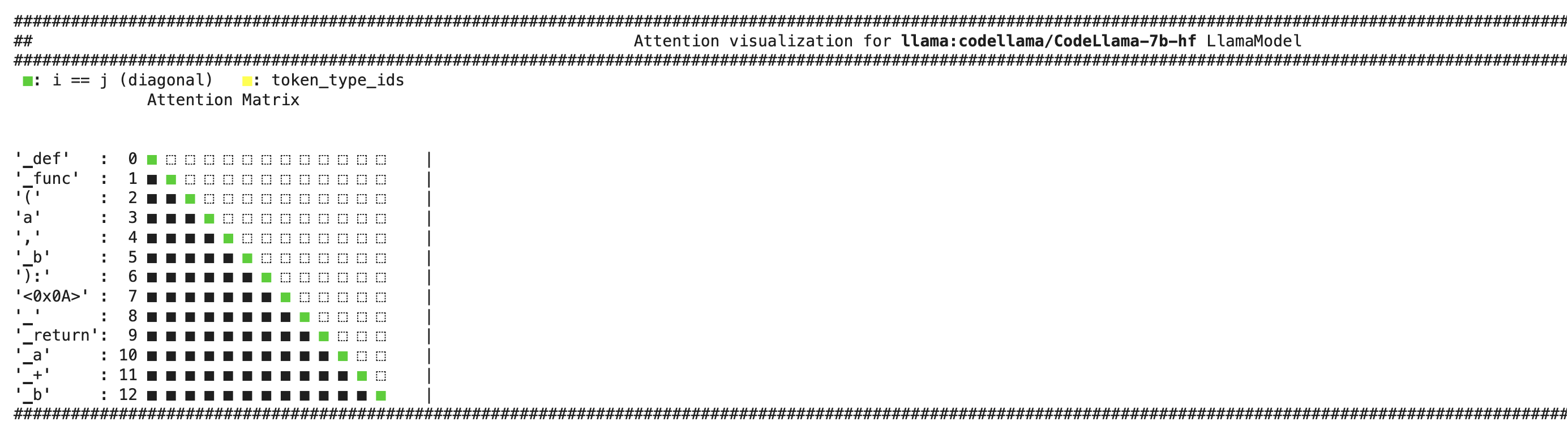
참고사항[[notes]]
섹션 제목: “참고사항[[notes]]”- 인필링 기능은 7B 및 13B 기반 모델에서만 사용할 수 있으며, Python, Instruct, 34B 또는 70B 모델에서는 사용할 수 없습니다.
- 코드를 채워 넣고 싶은 부분에
<FILL_ME>토큰을 사용하세요. 토크나이저는 이 토큰을 분할하여 원본 훈련 패턴 을 따르는 입력 문자열로 변환합니다. 이는 직접 패턴을 준비하는 것보다 더 안정적입니다.from transformers import LlamaForCausalLM, CodeLlamaTokenizertokenizer = CodeLlamaTokenizer.from_pretrained("meta-llama/CodeLlama-7b-hf")model = LlamaForCausalLM.from_pretrained("meta-llama/CodeLlama-7b-hf")PROMPT = '''def remove_non_ascii(s: str) -> str:""" <FILL_ME>return result'''input_ids = tokenizer(PROMPT, return_tensors="pt")["input_ids"]generated_ids = model.generate(input_ids, max_new_tokens=128)filling = tokenizer.batch_decode(generated_ids[:, input_ids.shape[1]:], skip_special_tokens = True)[0]print(PROMPT.replace("<FILL_ME>", filling)) - 추가 훈련이나 미세 조정에는
bfloat16을 사용하고 추론에는float16을 사용하세요. BOS문자는 접두사나 접미사를 인코딩할 때 인필링 작업에 사용되지 않으며, 각 프롬프트의 맨 앞에서만 사용됩니다.- 토크나이저는 SentencePiece를 기반으로 하는 byte-pair 인코딩 모델입니다. 디코딩 과정에서 첫 번째 토큰이 단어의 시작인 경우(예를 들어 “Banana”), 토크나이저는 문자열에 접두사 공백을 추가하지 않습니다.
CodeLlamaTokenizer
섹션 제목: “CodeLlamaTokenizer”[[autodoc]] CodeLlamaTokenizer - get_special_tokens_mask - save_vocabulary
CodeLlamaTokenizerFast
섹션 제목: “CodeLlamaTokenizerFast”[[autodoc]] CodeLlamaTokenizerFast - get_special_tokens_mask - update_post_processor - save_vocabulary